AI Agents for Web-to-Print: Run Your PrintNow Admin from Claude or ChatGPT
PrintNow's built-in MCP connector lets Claude, ChatGPT and Claude Code run your web-to-print admin: themes, catalogs, pricing, orders and content, with your yes.
Every print shop has an admin backlog. A theme change waits for a free afternoon. A price increase waits until someone has time to open 30 price grids. A new B2B store waits for a week of setup.
The work is not hard. It is just a lot of clicking, and it needs someone who knows where everything lives.
So we gave the Unified Admin a built-in AI agent connector. You connect Claude, ChatGPT or Claude Code to your PrintNow admin, and you ask for the work in plain words. The agent does it, shows you what will change, and waits for your yes. As far as we know, PrintNow is the first web-to-print platform with a built-in AI agent connector.
What an AI agent for web-to-print does
An AI agent is an AI app that can use tools, not just talk. Ask a normal chatbot to raise your prices and it tells you how. Ask an agent and it does it.
To use tools, the AI app needs a connector. The standard for this is MCP (Model Context Protocol). You may have seen "Shopify MCP" or "Stripe MCP." PrintNow's connector is the same idea, built for web-to-print.
Our MCP server gives the AI 349 tools across 26 areas of the admin. 158 tools look things up. 191 make changes. Each tool was written for PrintNow, with the rules and checks of the screen it replaces. That is why the agent knows where everything lives. You ask the way you would ask a PrintNow expert on your team.
What you can ask it to do
The best way to show it is with the requests people actually make.
Site themes
"Copy our theme, make the header navy, and let me try it with a test login before it goes live."
The agent clones the theme, edits its CSS and HTML, and sets the copy on one user group so you can try it. When you are happy, it applies the theme and clears the storefront cache so the change shows at once.
Product catalog
"Make the Holiday 2026 categories and move these 40 products into them."
It builds the categories, parents first, and moves the products. Bulk catalog changes handle up to 1,000 rows in one run.
Pricing
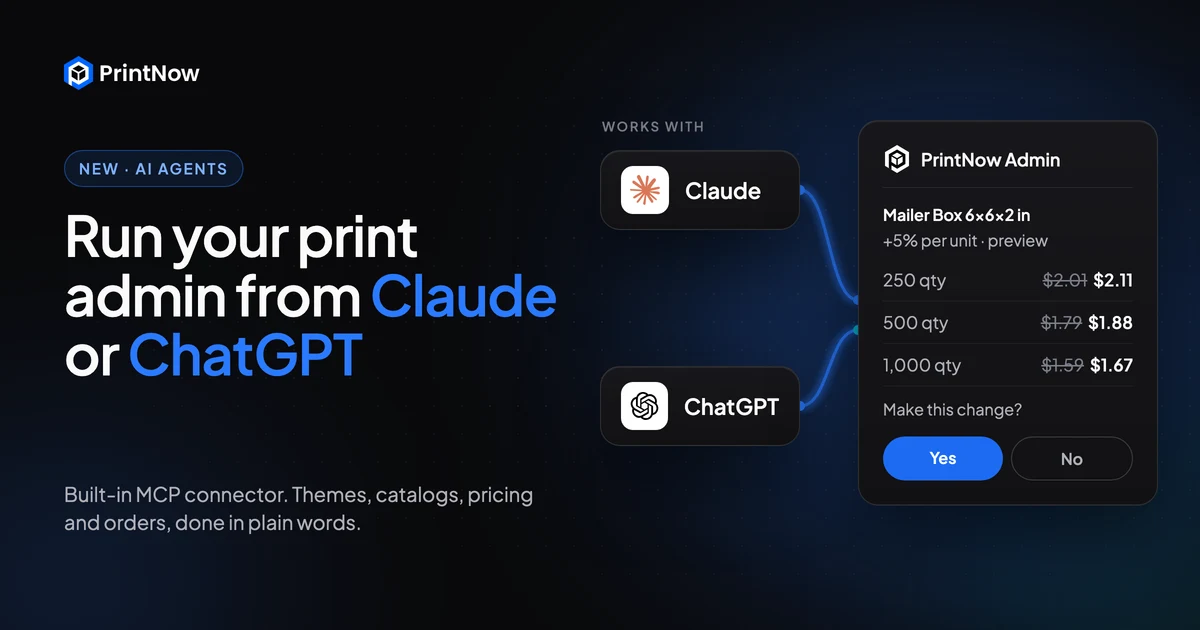
"Raise every mailer box price in the Retail store by 5%. Show me the preview first."
It finds the price grids and shows the old and new prices before it saves anything. A 6×6×2 mailer box at $1.79 each for 500 becomes $1.88, and you see every line like that before you say yes. With Print MIS, it can also preview what a configuration costs at any quantity, and it checks that a pricing change does not break other products.
Orders
"Move every order waiting on proof approval from last week to In Production."
It finds the orders and warns you first if the new status will email customers or send a job to a vendor such as 4over or Sinalite.
Content and SEO
"Write a meta description for every product that does not have one."
It writes the descriptions, shows you the list, and saves them in one run. It can also find and replace text across CMS pages and publish or unpublish them.
New stores
"Make a new B2B store for Acme from our template store, with its products, pricing and checkout settings."
It builds a new store from the parts you pick: products, pricing, pages, shipping methods, tax rates, promo codes and more.
It also answers questions. "How many orders came in last week, by store?" "Which products have no price?" "Export the site users who signed up this month." Reports and lookups never change anything.
Why this saves money
Most of the cost of running a web-to-print business is not the software. It is the hours people spend in it.
An agent changes where those hours go:
- Bulk work takes minutes, not afternoons. One request can change up to 1,000 prices, products or SEO fields, with a preview and an undo.
- Fewer jobs wait for a developer. Store setup, theme edits and catalog builds are jobs that shops often hand to someone else. Now you can ask for them.
- New staff get productive sooner. They do not need to know which screen holds a setting. They ask, and the agent finds it and names the screen.
- Nothing waits for "someone who knows the admin." The agent knows it, and it is there at 11 PM.
Built so you stay in control
Letting software change your live store should make you careful. We were careful too.
- It works as you. The agent uses your name, your roles and your stores. It can never do more than you can do in the admin.
- You pick the access. A connection is Read only (the default) or Read and write. You also choose which areas it may use, such as Orders or Pricing, and whether the connection lasts 7 or 30 days.
- Risky changes wait for your yes. The agent shows what will change and in which store before it saves. Claude Code shows PrintNow's own approval prompt. In Claude and ChatGPT, you reply yes in the chat.
- Bulk changes can be undone. Undo puts the old values back in reverse order.
- Changes are logged. Each change shows in the Activity Log under your name, marked with the AI app, for example "via Claude."
- Shopper data is masked. Names, emails, phone numbers and addresses come back masked unless you agree to show them. Passwords and API keys are never shown.
- Some areas stay human-only. The agent cannot change admin users, roles or passwords, manage API keys, delete stores, or change license settings.
- Daily limits stop a runaway agent. Normal use never reaches them, and the admin itself is never limited.
How to connect it
It takes about two minutes, and there is nothing to install.
- In the admin, open the profile menu and click AI agents. Make a connection code and choose the access.
- In your AI app, add a custom connector with the URL
https://mcp.w2p.com/mcp. - A PrintNow sign-in page opens. Paste the code, check what the agent may do, and click Allow.
The step-by-step guide, with screens for Claude, ChatGPT and Claude Code, is in the docs: Connect an AI Agent. The full list of tools is in the AI Agent Tool Reference.
AI agents are included in the Growth and Enterprise plans. A Super Administrator makes the connection.
Supported AI apps
| App | What to know |
|---|---|
| Claude Code | The best experience. It shows PrintNow's approval prompt for each change, so every kind of change an agent is allowed to make is available. |
| Claude (claude.ai, desktop and mobile apps) | You approve changes by replying yes in the chat. A few changes, such as payment, email and carrier credentials, can only be made in the admin or from Claude Code. |
| ChatGPT | Developer mode must be on. You approve changes by replying yes in the chat. The same few changes can only be made in the admin or from Claude Code. |
Why we built it
We build PrintNow with AI every day. I wrote about that in AI-Powered Web-to-Print Development. The AI agent connector comes from the same belief: the fastest way to get work done in software is to say what you want and check the result.
Now your team can work that way too. The admin you know is still there, screen for screen. You just do not have to click through all of it anymore.