

Print Workflow Software
Print automation software that runs your production
Print workflow software that automates order intake, proofing, job routing, and fulfillment. Cut manual work, reduce errors, and scale your print business with confidence.
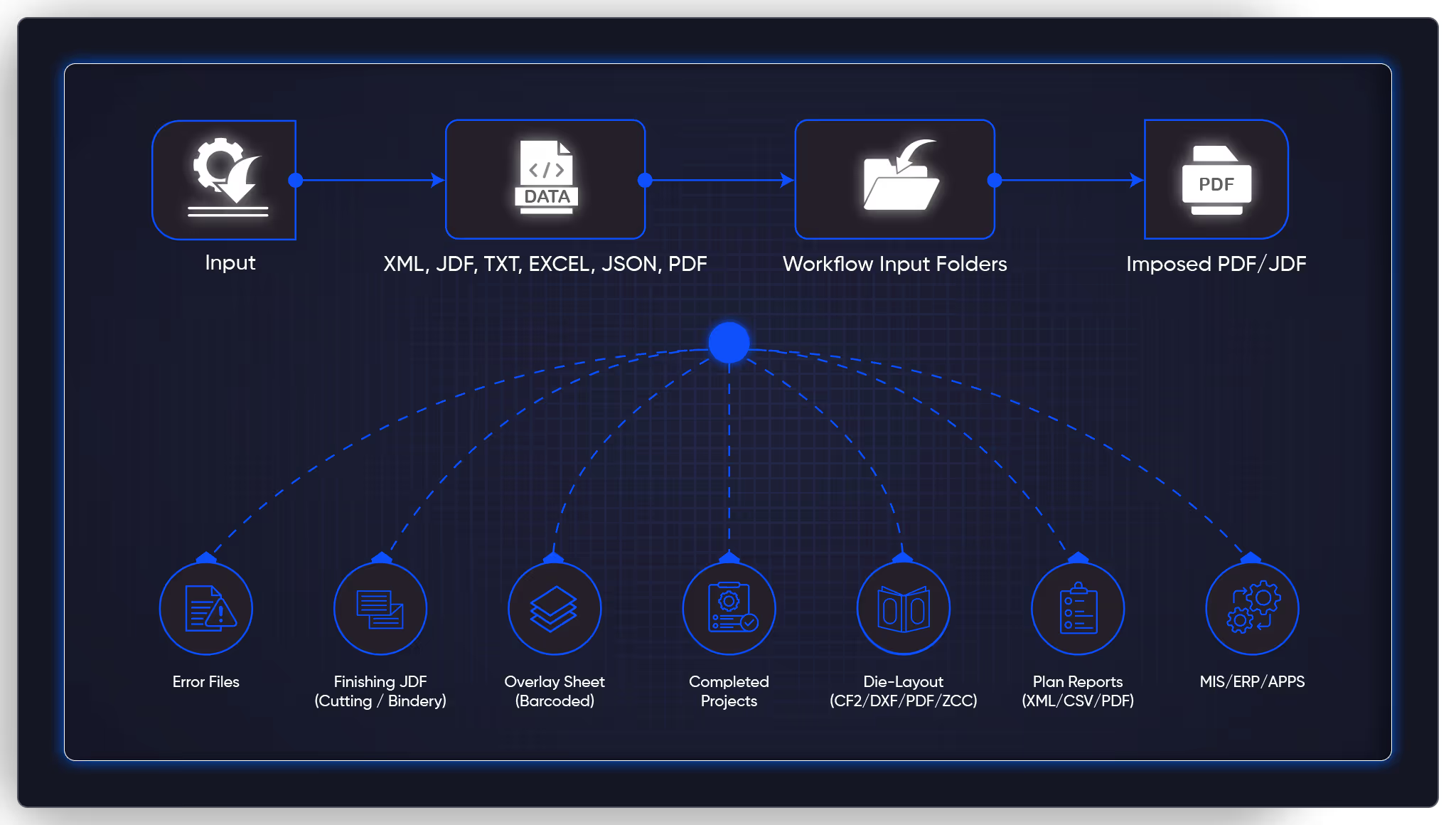
Print workflow automation that eliminates bottlenecks
Outdated, manual processes often lead to delays, wasted resources, and frustrated teams and clients. PrintNow’s print automation software keeps everything running smoothly so you can focus on growing your business — start with the seven stages you can automate.
What’s slowing your team down?
Disconnected systems
Managing multiple dashboards? Consolidate everything for a smoother workflow.
Long approval process
Streamline proofing and approvals to keep jobs moving.
Complicated print jobs
Automate complex setups and eliminate costly errors.

Tracking challenges
Gain real-time visibility on orders and customer interactions.

Scattered data
Disconnected and separate reports make it difficult to track performance. Centralizing data helps measure progress, analyze trends, and make informed business decisions.
Print workflow software that works for you, not the other way around
Expert automation, backed by industry leaders
PrintNow doesn’t just give you software. We provide an end-to-end automation strategy. Whether you’re just getting started or refining an existing workflow, we’ve got your back.
Trusted partnerships, smarter automation
We support Esko Automation, Enfocus Switch, and HP SiteFlow via our Enterprise API. Our strategic collaborations ensure that your automation is future-proof, scalable, and built for success.
We also work with the best in modern AI workflow automation platforms using n8n.io to deliver seamless, powerful integrations hosted on PrintNow or self-hosted.
Why PrintNow
How print automation software empowers your business:
Tailored Automation
Built for Enterprise print providers, customized for your needs.
Scalable Growth
Start simple, then expand with full automation as you grow.
Seamless Integrations
Connect your existing tools for a hassle-free workflow.
Expert Support
Get hands-on guidance to ensure your automation runs smoothly from day one.
What is print workflow automation?
Print workflow automation is software that connects the stages of print production — order intake, prepress, proofing, scheduling, printing, finishing, and fulfillment — so that files, data, and status move between them without anyone carrying them across. It ranges from a single automatic email when a proof is approved, to an online order that reaches a press queue with nobody touching it.
You do not have to automate everything at once. For a shop running hundreds of jobs a week, even partial automation pays — and most shops start with whichever stage is causing the worst backlog.
The seven stages of a print workflow you can automate
Online order intake
Customers build their own orders online — product, artwork, stock, quantity, finishing, payment. The specifications flow straight into production with no re-keying, no misread email, no file saved to the wrong folder. Files are validated on upload, before the order is even submitted.
Automated PDF preflight
Every file is checked against your rules the moment it arrives: page dimensions, image resolution, bleed and trim, embedded fonts, CMYK color space, flattened transparency. Passing files move on by themselves. Failures are flagged or bounced back with specific instructions — caught at the cheapest point in the process, before any press time is spent.
Imposition and prepress
Jobs are arranged onto press sheets by rules you define — sheet size, press type, finishing, grain direction — and ganged automatically when they share stock and run length. Crop marks, color bars, and registration marks are added without anyone placing them. Your prepress team keeps the jobs that actually need judgment.
Proofing and approval
Customers review, annotate, and approve their proof in a self-service portal, and approval advances the job on its own. Repeat orders with no changes can skip proofing entirely. This is usually the biggest bottleneck in the shop, and it is the one that responds fastest to automation.
Job routing and scheduling
Approved jobs are matched to the right press by their own characteristics — sheet size, color count, stock, quantity, finishing. Short digital runs go to the digital queue, long offset runs to the offset press, wide format to large format. Scheduling also groups jobs on the same stock to cut changeovers.
Production tracking
Barcode scans at each station update job status automatically, feeding customer-facing order tracking, internal dashboards, and status emails at printing, finishing, and shipping. It removes the most common support call there is — “where is my order?” — and shows managers where work is piling up.
Fulfillment and shipping
Completed jobs trigger label generation, multi-carrier rate shopping, and pickup requests. Tracking numbers are emailed to the customer and logged against the order. Trade printers shipping blind to a reseller's customer get the address routing and branded packing slips handled the same way.
How to get started without rebuilding your shop
The fastest return comes from automating the stage that is costing you the most right now, then connecting the next one. Each stage you automate makes the one after it easier to reach. This is a progression, not a single switch-over.
Start with order intake
A web-to-print storefront with an online editor removes the highest-friction point: getting clean orders and print-ready files out of customers in the first place.
Web-to-print storefront→Add automated preflight
Once orders arrive digitally, automatic file checking catches problems before they reach production instead of after.
Web-to-print editor→Automate proofing
Self-service proof approval removes the email back-and-forth that stalls the production schedule more than any other stage.
See it working→Connect your MIS
Integrations between the platform and your existing MIS, press controllers, or fulfillment systems close the loop from order to delivery.
Browse integrations→Layer in tracking
With the core workflow automated, add customer-facing tracking and automated status emails on top.
Track performance→Frequently asked questions about automating print production
Real businesses, real impact
More than software, PrintNow provides end-to-end automation strategies tailored to your stage\u2014from first setup to advanced optimization.
“PrintNow’s dedicated team of experts truly impressed us during our site redevelopment and launch. Their end-to-end solution, from site redesign tools to order fulfillment and print automation, showed deep operational understanding, critical to our success.”
Michael Franz
Project Manager, Folder Printers

All features
Discover all you can do with PrintNow.


Explore more